Work-Study
About the Portal
This section is for authorized on-campus work-study employers who are submitting a Work-Study Authorization (WSA) in the Work-Study Portal.
NOTE: If you are seeing excessive errors in the Work-Study Portal, please clear your cache and cookies and press Ctrl + F5 to reload the site. If the errors persist, please email sfs.workstudy@wsu.edu.
Contacts
Student Financial Service
(509)335-9711
Lighty Student Services Room 380
Payroll Services
(509)335-9575
French Administration Room 236
Human Resource Services
(509)335-4521
Modernization
modernization.wsu.edu/contact/ to submit a ticket
Employer steps to appoint a work-study student
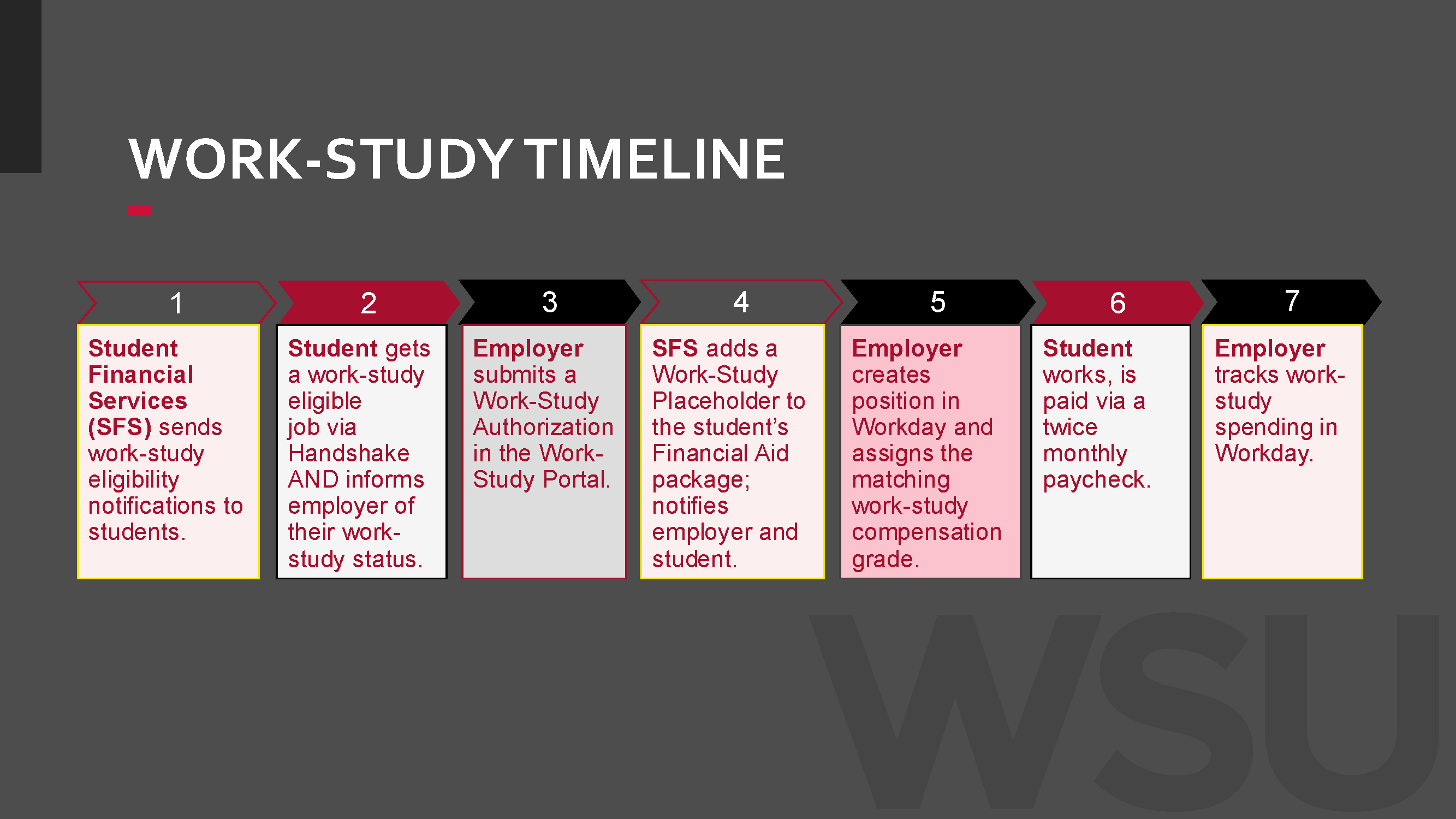
Students will apply for jobs via Handshake. Once you've identified a student you'd like to hire, follow these steps below:
Adding Authorizations
Note: We recommend the department's fiscal specialist with HR Partner permissions in Workday to enter WSAs as they must change compensation grades and track work-study spending in Workday. If that's not possible, please be sure to list your department's HR Partner as the secondary contact on the WSA so they will also be notified of any updates. We encourage employers to coordinate with their department's HR Partner at all points in this process, regardless of who is entering the WSA.
Log into the Student Financial Services Work-Study Portal.
To add a new authorization, click the blue "Add Authorization" button in the top left.
Enter the academic year and student's WSU ID number.
If the student isn't eligible for work-study, a red notification will appear in the top-right corner.
If the student is eligible, a Work-Study Authorization (WSA) form will appear.
Once you fill out and submit the form, the authorization will appear in a list on the main Work-Study Authorization page. All authorizations you've submitted will be viewable there.
Awarding
Once the WSA is submitted, please give Student Financial Services 3-5 business days to process the form. Once it's processed, the employer and student will receive an email letting them know the Work-Study Placeholder is on the student's account.
We recommend students don't start working until they have received an email confirmation from SFS notifying them they have been awarded work-study. If a student starts working before confirmation of work-study posting, there is a risk of paying the student's wages entirely from departmental budget.
The employer and HR Partner need to work together to ensure the student's compensation grade is set to the applicable work-study grade in Workday.
Assigning Work-Study in Workday Reference Guide: PDF // Word Doc
There are multiple compensation grade options for both state and federal work-study, but they all start with SWS or FWS. Please make sure the work-study position complies with the student employee classification and compensation guidelines provided by HRS.
Without this step, the student won't receive their work-study award and your department may be responsible for funding 100% of the student's position.
Workday's work-study data integration runs nightly. After the work-study compensation grade is assigned to the employee's position, the work-study award information appears in the employee's Position Restrictions ⇒ Additional Data tab the following day. Access to this data is typically limited to your department's HR Partner, so coordination with them may be necessary.
Tracking
You can track work-study spending with the CR PAY Work-Study Payroll Transactions report in Workday.
This report shows the funding split in the Pay Component column—40% from the department budget and 60% from work-study funding. Both funds together can go up to the semester's earnings cap provided in the awarding email.
WS + WT = Work-Study Award
Federal: FWS and FWT
State: SWS and SWT
For example, a student was awarded $3,000 in state work-study for the fall semester.
SWS (40%)
SWT (60%)
Work-Study Earnings Cap (100%)
$1,200
$1,800
$3,000
When both pay components are nearing the award amount, the student should be switched to student hourly, which is 100% funded by the department.
Key Processing Reminders
The award amount for 2026-27 is $6,000—$3,000 for fall and $3,000 for spring. This is an earnings cap—a student can earn up to this amount in work-study but may earn less depending on how much they work.
If a student's work-study is reduced or cancelled, your department will be responsible for covering the student's wages as a student-hourly employee at the same rate of pay. We recommend factoring this into budget planning, as it can impact departmental costs.
Benefits cannot be assigned to work-study budgets. If you find benefits are being misattributed to work-study budgets in Workday, please contact payroll for assistance.
If you have any questions about the process, please don't hesitate to contact us at sfs.workstudy@wsu.edu.